Campaign Creation - 2 - Choose Focus (V2)
Start by deciding how you want to choose the campaign focus. You can upload a document, choose the focus manually, or use a previous campaign as the starting point.
If you already have an improvement plan or review document, choose Upload a document so the system can suggest relevant focus areas from it. If you want full control, choose Choose manually and browse the focus areas and sub-topics yourself. If this campaign is similar to one you have done before, choose Use a previous campaign so you can begin with those focus areas and adjust them as needed.
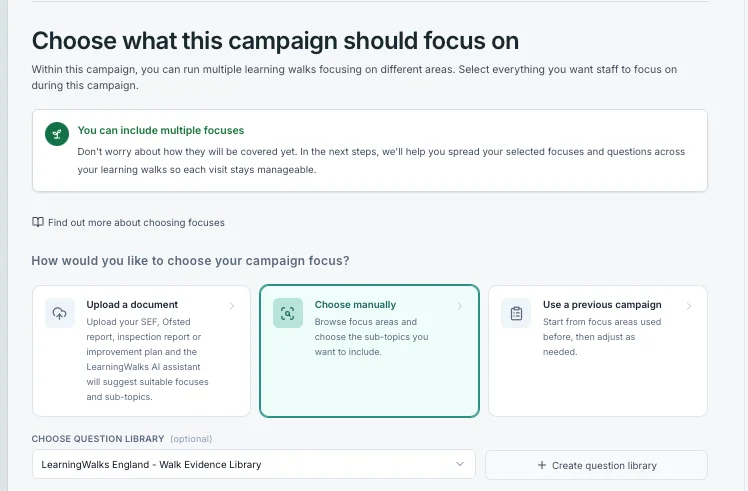
Next, select the Question Library you want to use, this helps shape the recommended plan and gives you the right set of focus areas and questions. You can also use the search box to find specific focus areas, sub-topics, or questions more quickly.
Then work through the focus areas list on the left and choose the sections that matter for this Campaign. Open each area, review the sub-topics and questions, and tick the ones you want included. The panel on the right shows how many sub-topics and questions you have selected, and assesses the Campaign load, so use that as a guide before continuing.
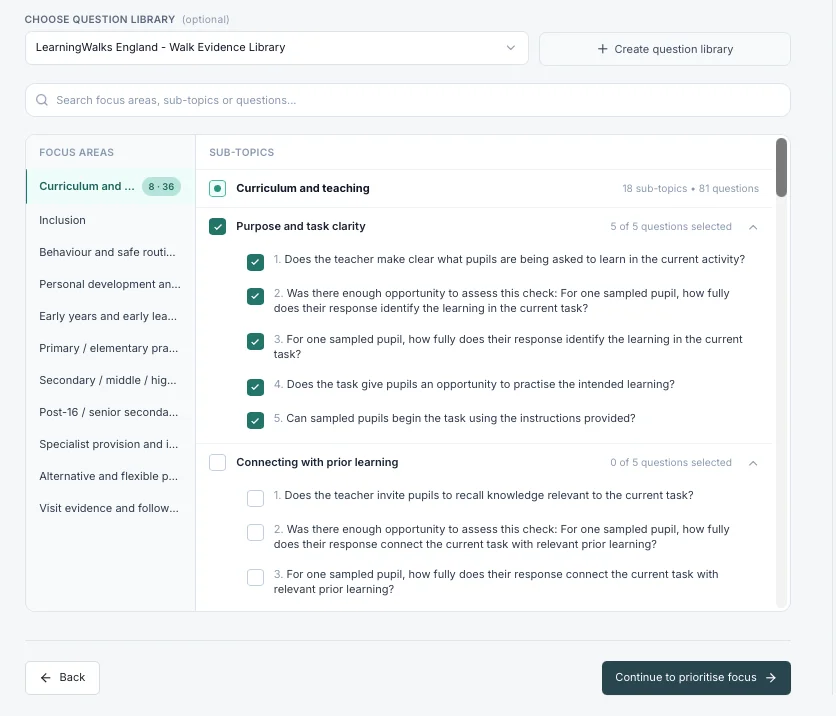
Once you have selected at least one question, you can move on to the next step.
Click below for Step 3 - Prioritise Focus
https://service.learningwalks.com/p/campaign-creation-3-prioritise-focus-c3NOXx