Campaign Creation - 3 - Prioritise Focus (V2)
On the Prioritise focus screen, start by deciding which areas of the campaign matter most. Place the focus areas into High, Medium, or Low priority depending on how much attention they should receive in the learning walk plan.
Use High priority for the areas you want to appear earlier, more often, or across more walk cycles. Keep most of your focus areas in Medium priority if they should be included normally in the recommended plan. Move any areas that still matter but need less emphasis into Low priority so they can appear later or less often.
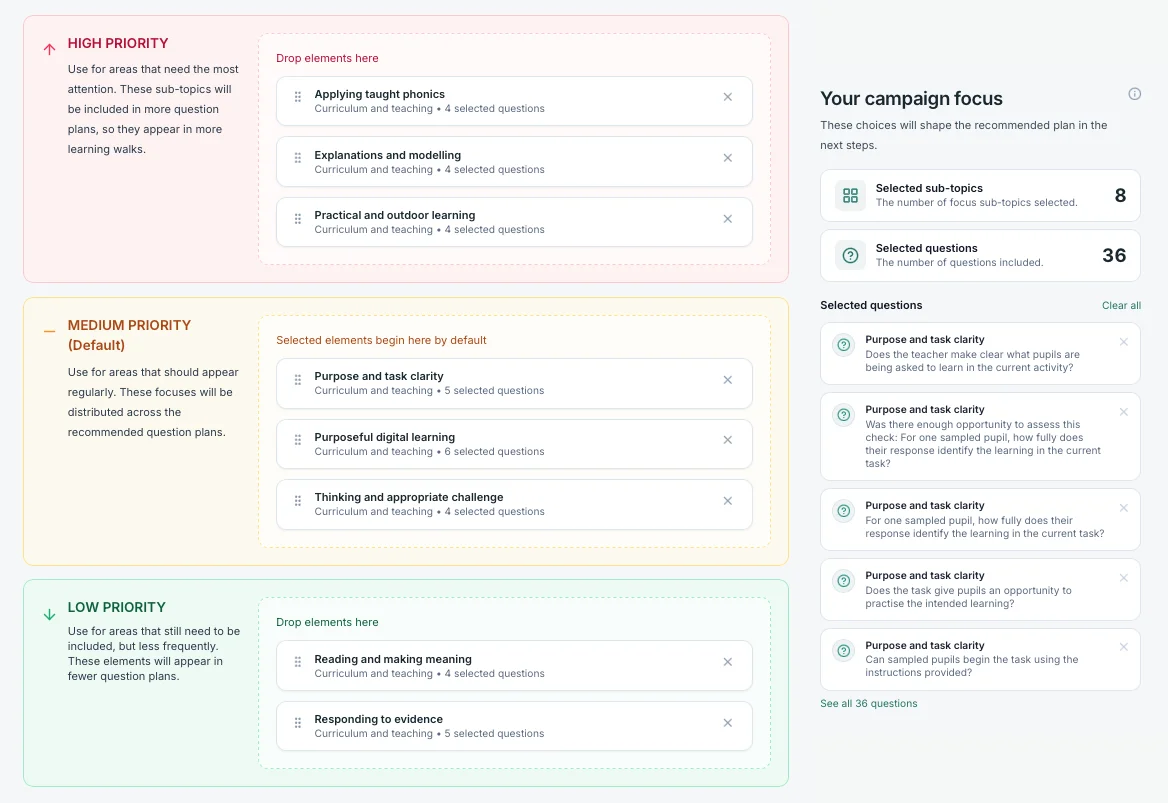
To change a priority, drag a sub-topic into the appropriate section or move it from medium into high or low. You can also remove an item from a section using the option on the item itself if you need to reassign it. The summary panel on the right shows how many areas and questions are in each priority level, along with the overall campaign load, so use that to check the balance before continuing.
If the plan feels too heavy, reduce the number of high-priority items or reset the priorities and start again.
Once the priorities look right, continue to the next step.
Click below for Step 4 - Create Question Plan
https://service.learningwalks.com/p/campaign-creation-4-create-question-plan-QURiCm